


QDOBA Mexican Eats
4.86.36K Reviews
App Specs
- Version
- 37.12.0
- Updated On
- License
- Free
- Downloads
- 1,000,000+
- Developer
- Qdoba Digital
- Categories
- Food & Drink
- Platform
- Android
Screenshots
 Analysis by AppCompare
When several people share a meal decision, the hard part is often not finding food but getting everyone’s preferences into one order without a long back-and-forth. I find QDOBA Mexican Eats most useful when the group already wants QDOBA and one person can bring the choices together. It is a free Food & Drink app from Qdoba Digital, built around choosing a meal and arranging pickup or delivery rather than browsing restaurants in general.
A shared meal, with one person keeping the order together
Picture a weekday evening when one adult is heading home and the rest of the household is hungry. Instead of trying to remember several spoken requests, the person placing the order can work through the menu and customize each meal. That makes the app a practical choice for a household with different preferences: one person can ask for a particular combination, another can choose something milder, and the person ordering can review the selections before moving on.
The useful distinction is that this is a restaurant ordering tool, not a shared household planner. I would not assume that everyone can edit one order together or that the app has family profiles. If several people are using the same phone, it is simpler to have one person handle the order and confirm choices with everyone before checkout. That small habit helps avoid the familiar problem of a missing topping or an order that reflects the preferences of only the person holding the device.
Keep account and payment choices deliberate
Shared-device convenience has a boundary: an account and its payment choices are personal, even when the phone is passed around the kitchen. I would let one trusted adult manage sign-in, payment, and the final purchase, while other household members provide their meal choices. If someone else needs to use the phone, handing it over for menu browsing is different from handing over control of an account or payment screen.
Before placing an order for more than one person, I’d check the restaurant selected and read back the customized meals. This is especially worthwhile if the order is being collected by someone who did not build it. The app’s step-by-step approach can make customization feel straightforward, but a careful final review is still a better safeguard than relying on memory or assuming everyone interpreted an ingredient choice the same way.
Useful for coordination, not every kind of group order
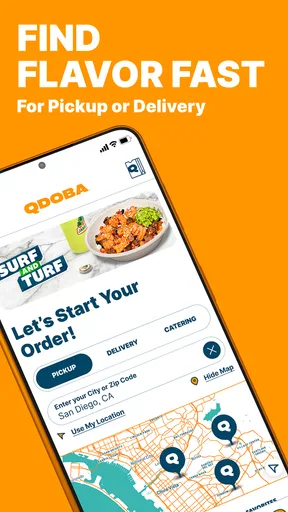
For a small household order, a single person can coordinate the choices and arrange pickup or delivery. The location tools also help when the group is deciding where to order from: checking a nearby restaurant’s menu and hours can prevent an avoidable detour. For a gathering, catering is a separate option worth exploring rather than trying to treat a large group meal like a pile of individual everyday orders.
There is a trade-off between convenience and flexibility. If the group has not settled on QDOBA, this app is not a broad restaurant comparison tool; it narrows the decision to one brand. If everyone wants to compare cuisines, delivery choices, or restaurants in one place, a general food-ordering service may be a more natural starting point. I’d use QDOBA’s app once the group has chosen the restaurant, especially when customizing individual meals is the main task.
Worth Reading Before You Choose

EA SPORTS FC Mobile 26 Is a Bigger Football Game, but It Takes Time

Flipboard Shows What News Apps Must Do Beyond the Feed

Switching to Android Auto Means Rethinking Your Driving Routine

Google Calendar Makes a Crowded Week Easier to Manage

Ludo King Makes the Most of the Minutes Between Plans

Baby Panda World Brings Quick Play to Modern Phones, but Its Game Library Feels Busy
Age, trust, and adult oversight
The app is rated for Everyone, which makes its age context broad, but that should not be confused with permission for a child to make purchases independently. A younger household member can help choose ingredients while an adult handles the account and confirms the order. That division keeps the meal decision collaborative without treating a general-audience rating as a substitute for payment supervision.
For adults who order regularly, saved order history can make a familiar meal easier to repeat. For a shared device, though, that convenience works best when the account holder is comfortable with other users seeing previous choices. I would keep the distinction clear: reordering is handy for the person who knows what the household wants, but it should not be used as a shortcut when preferences or plans have changed.
Getting Started with QDOBA Mexican Eats
First things first, downloading the app was a breeze. Whether you're rocking an Android or an iOS device, QDOBA Mexican Eats is ready and waiting for you in the app store. Just a quick search and a tap, and you're on your way to a world of burrito bowls, tacos, and more.
Upon opening the app, you'll be greeted with a colorful, inviting interface. It's like stepping into a digital fiesta! The layout is super user-friendly, with all your options laid out clearly. Whether you're a tech whiz or someone who still struggles with the TV remote, navigating this app is a piece of cake (or should I say, a slice of tres leches?).
Ordering Made Simple
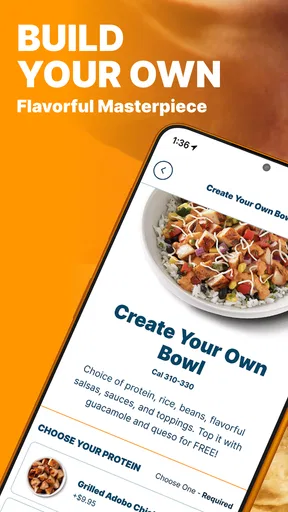
One of the standout features of the app is its straightforward ordering process. You can customize your meal just the way you like it—extra guac, hold the onions, you name it. The app walks you through every step, ensuring you don't miss out on any toppings or sides. It’s like having your own personal chef who knows exactly what you want.
And let’s talk about payment options. The app accepts all major credit cards, and you can even use Google Pay or Apple Pay. Convenience at its finest! Plus, the app remembers your past orders, so reordering your favorite combo is just a tap away. No more scrambling to remember what you had last time—QDOBA's got it covered.
Rewards and Perks
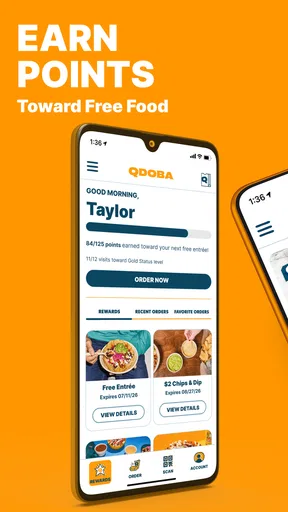
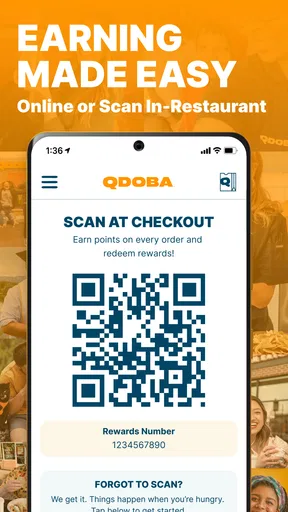
Who doesn’t love a good deal? With the QDOBA Rewards program, you earn points for every dollar spent. Rack up enough points, and you can score free entrees and more. The app keeps track of your points, so you always know how close you are to your next freebie. It's like a delicious game where everyone’s a winner.
On top of that, the app regularly features exclusive offers and promotions. It’s definitely worth checking in to see what tasty deals are on the table. Just imagine getting a notification about a surprise discount on your favorite burrito bowl—talk about a day-maker!
Location, Location, Location
If you’re ever in a new city and craving some familiar flavors, the app’s location finder is a lifesaver. It’ll pinpoint the nearest QDOBA restaurant, making it easy to find your way to a tasty meal. You can also check out each location’s menu, hours, and even place your order for pickup or delivery. It’s like having a local guide right in your pocket.
And if you’re planning a big event or just feeding a hungry crowd, the catering options are all laid out for you. The app provides all the details you need to cater your next fiesta, from pricing to menu options. It’s perfect for when you want to impress without the stress.
Final Thoughts
All in all, QDOBA Mexican Eats is a fantastic app for anyone who loves good food and a seamless ordering experience. It's packed with features that make meal planning and ordering not just easy, but actually enjoyable. Whether you're a QDOBA regular or a newcomer looking to try something new, this app is a must-have on your phone.
So next time hunger strikes, skip the line and tap your way to a delicious meal with QDOBA. Trust me, your taste buds will thank you!
Where it fits among food-ordering options
QDOBA’s app makes the most sense when the restaurant itself is already the decision. Compared with a broad delivery app, it keeps the focus on QDOBA’s menu, customizations, rewards, and locations instead of asking you to sort through unrelated restaurants. That can reduce decision clutter for a regular customer, but it is less useful when your main goal is comparing nearby places, cuisines, delivery estimates, or restaurant-wide deals.
Compared with ordering in person, the app gives you time to look over the choices and put together a customized meal before you reach the counter. That is handy if you are particular about ingredients or coordinating several orders. The exchange is that you need to enter the choices accurately yourself and make sure the selected location suits your plans. For someone who prefers asking staff questions face to face, ordering at the restaurant may be the better fit.
Small habits that make ordering smoother
One practical tip is to settle the pickup or delivery plan before building a complicated group order. If people are still deciding where they will be, a customized cart can become a source of confusion rather than a time-saver. I’d first confirm who is collecting the food or where delivery should go, then gather everyone’s choices and place the order through the selected location.
Order history is useful as a memory aid, not a guarantee that last time’s meal still suits today. I’d use a previous order as a starting point, then check each item and customization before repeating it. This matters particularly in a household, where the person placing an order may be reusing a meal originally chosen by someone else. A quick confirmation is easier than discovering at dinner that the familiar order was not so familiar after all.
Rewards and offers can add another reason for a regular customer to check the app, but I would not let a promotion dictate the meal if the household has already settled on something else. It is worth reviewing what is available while planning, then comparing it with the actual order you intend to place. That keeps the app’s deal-focused moments helpful rather than turning a simple dinner decision into extra browsing.
Who should use it, and who may prefer another route
I’d recommend it to people who already enjoy QDOBA, want to customize a meal, or often coordinate a pickup for a partner, friend, or household. It is also a reasonable choice for someone visiting an unfamiliar area who wants to check nearby QDOBA locations before deciding where to go. Its value is strongest when the brand’s menu is what you want, not merely one possibility among many.
I would skip it as my first choice if I rarely eat at QDOBA, want to compare multiple restaurants, or prefer not to create and manage an account-based ordering routine. A person who wants a quick walk-in meal with no advance planning may find the app unnecessary. Likewise, if a group has a wide range of restaurant preferences, a general ordering service or a direct conversation about options can solve the bigger problem better.
What to expect from the app over time
The app has an average rating of 4.8 from around 41,000 ratings, alongside roughly 6,300 written reviews, and it has passed one million installs. Those figures suggest that many people use it, but they are not a promise that every restaurant visit or order will go perfectly. I’d judge it by the task it is meant to handle: finding QDOBA, customizing a meal, and arranging a convenient way to get it.
It is free to download, carries an Everyone age rating, and is currently at version 37.9.0, with Android 7.1 as the minimum operating-system requirement. It has been available since December 4, 2016, so this is an established ordering app rather than a newly launched experiment. For a household, the main decision is less about age labels and more about who should control the account and confirm the purchase.
A realistic household verdict
In my view, this is a useful specialist app when one person is coordinating a QDOBA meal and the others can communicate their preferences clearly. It can make a shared dinner order less dependent on memory, and the location and ordering tools help connect the menu choice to a practical pickup or delivery plan. The strongest approach is simple: agree on the restaurant, collect each person’s choices, have the account holder review the order, and let that person complete payment.
Qdoba Digital has made an app that serves a clear purpose, and I like that it focuses on the steps a customer actually needs to take rather than pretending to replace every food-ordering option. The limits are just as clear: it is tied to one restaurant brand, and a shared phone does not automatically mean shared account access should be casual. If those boundaries work for your household, I’d keep it handy for the nights when everyone wants QDOBA and nobody wants to negotiate the order from scratch.
Pros
- User-friendly interface for easy navigation.
- Customizable meal options to suit dietary needs.
- Loyalty program with rewards and discounts.
- Quick access to nutritional information.
- Efficient online ordering for fast pickup.
Cons
- Limited payment options available in-app.
- Occasional glitches with order tracking.
- Push notifications can be excessive.
- Requires constant updates for optimal use.
- Location services drain battery quickly.
FAQs for QDOBA Mexican Eats
What features does the QDOBA Mexican Eats app offer?
The QDOBA Mexican Eats app provides a variety of features designed to enhance your dining experience. Users can easily browse the menu, customize their orders, and find nutritional information. The app also allows for quick mobile ordering, tracks rewards points, and provides exclusive offers. Additionally, you can locate nearby restaurants and check their operating hours.
How does the rewards program work in the QDOBA app?
The QDOBA app features a rewarding loyalty program where users earn points with every purchase. These points can be redeemed for free menu items. Simply scan your app at checkout or use it when ordering online. The app keeps track of your points and notifies you when you have enough for a reward, ensuring you never miss out on free food.
Can I customize my order through the QDOBA app?
Yes, the QDOBA app allows for full customization of your orders. You can choose from a variety of ingredients to build your perfect meal, whether it's a burrito, bowl, or taco. The app provides options to modify protein, toppings, and sauces, ensuring your meal is tailored to your taste preferences.
Is mobile ordering available for all QDOBA locations?
Mobile ordering through the QDOBA app is available at most locations, but it's always a good idea to check the availability for your local restaurant. The app makes it easy to locate participating locations, and you can save your favorite store for faster future orders. This feature ensures convenience for users on the go.
What security measures are in place for payment transactions on the app?
The QDOBA app implements robust security measures to protect your payment information. It uses encryption and secure servers to handle transactions safely. Users can store payment information for quick checkout, and the app complies with industry-standard security protocols to ensure that your personal and financial data remain secure.


